Accessibility Statement
Data Center Fan should be usable by people who navigate with a keyboard, read with a screen reader, need larger text or higher contrast, or turn animation off. This page records what we have measured, what currently conforms, what does not yet, and how to tell us when something blocks you.
Audited against the real interface.
Conformance claims on this page were checked on the running site — every published route, at desktop and mobile widths — not inferred from the design files.
Conformance status
Data Center Fan aims to meet Web Content Accessibility Guidelines (WCAG) 2.2 at Level AA. The marketing, guide, Academy, devlog and legal pages are believed to conform. The game screen at /play is partially conformant: the exceptions are listed further down this page, and none of them are things we consider settled.
This statement was last reviewed on 16 August 2026 and is based on a self-assessment: an automated pass with axe-core plus manual keyboard, focus-order, zoom and contrast testing on the live build. It has not been independently audited by a third party.
What works today
- Keyboard only: every link, button, form field and menu on the site can be reached and operated with Tab, Shift+Tab, Enter and Space. Nothing traps focus.
- Visible focus: a high-contrast focus ring follows the keyboard through the whole product, and it is designed as a two-tone ring so it stays visible on both the pale document panels and the near-black pages.
- Skip to content: the first Tab on any page reveals a "Skip to content" link that jumps past the header straight to the page body.
- Screen readers: pages use real landmarks (banner, navigation, main, contentinfo), a single H1, and headings in order. Moving between pages moves focus to the new page body and announces it, which a single-page app does not do on its own.
- Text contrast: body, label and interface text meets the 4.5:1 minimum (3:1 for large text) against its actual background, including the tinted panels and the animated page backdrop.
- Reduced motion: if your operating system is set to reduce motion, the animated facility, weather, particle effects, page transitions and interface animations all stop.
- Zoom and reflow: pages reflow to a single column at 320 CSS pixels wide and at 200% browser zoom without horizontal scrolling or clipped content.
- Forms: the account dialog labels every field, exposes validation errors to assistive technology as they happen, supports password managers, closes with Escape, and returns focus to whatever opened it.
- No colour-only meaning: links inside body text are underlined, and status is always carried by text as well as colour.
Known limitations
We would rather name these than quietly claim full conformance.
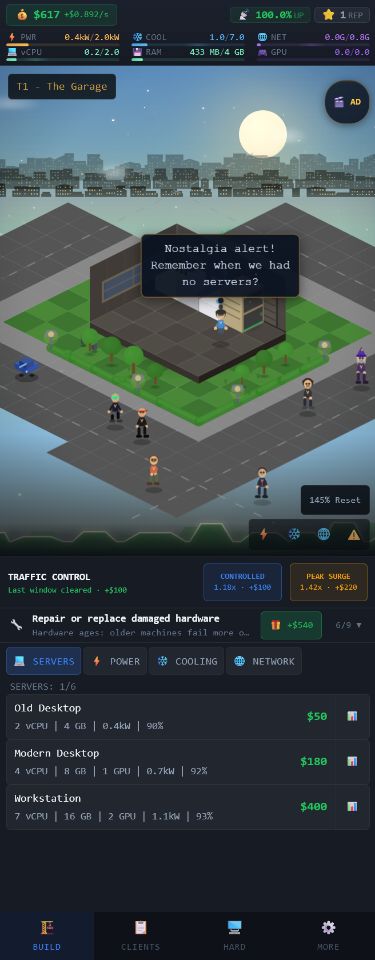
- The game floor is a visual simulation. The isometric facility at /play is a rendered scene: placing equipment, reading heat and power spread across the room, and the spatial relationships between machines are conveyed graphically. Numeric readouts for capacity, power, cooling and health are available as text in the resource rail and hardware panels, but the floor itself does not yet have a non-visual equivalent.
- Game panels are not fully labelled. Some in-game controls are icon-only and rely on their visual grouping for meaning. We are working through them.
- Alternate game colour themes are unverified. The default theme meets the contrast minimums; the optional themes have not all been re-measured yet, so a switched theme may fall below AA.
- The admin panel is out of scope. It is a private, single-operator tool and has not been audited.
- Timed operations. Live load windows and some incidents run against a clock. The game can be paused and speed-adjusted, but the timing itself is a core mechanic rather than an adjustable preference (WCAG 2.2.1 allows this as an exception for real-time events; we still intend to add more slack).
Assistive settings we respect
- prefers-reduced-motion — stops decorative and interface animation product-wide.
- Browser zoom and text-only zoom up to 200% — layouts reflow rather than clip.
- Operating-system font size and forced dark mode — the site is dark by design and does not fight your settings.
- Password managers and autofill — account fields carry standard autocomplete hints.
- Sound is optional. Music, ambience and effects can each be turned down or off in the game, and nothing in the game depends on hearing it.
How this was tested
- AUTOMATED SWEEP — axe-core run against every published route at 1280px, checking WCAG 2.0/2.1/2.2 A and AA rules plus common best practices.
- CONTRAST MEASUREMENT — Every distinct text colour was measured against its real composited backdrop — including the tinted gradient wash behind the pages, which generic tools cannot resolve.
- KEYBOARD PASS — Tab traversal of each page and dialog: focus visibility, focus order, escape routes, and focus return after a dialog closes.
- REFLOW PASS — Every route measured for horizontal overflow at 320px and 375px widths and at 200% zoom.
- STRUCTURE PASS — Landmarks, heading order, link and control names, image alternatives, form labelling and language declaration checked per route.
Tell us about a barrier
If something on datacenter.fan or in the game stops you, please email privacy@datacenter.fan. Data Center Fan is made by one developer, so there is no ticket queue to get lost in — the message reaches the person who can fix it.
It helps if you can say which page or screen, what you were trying to do, and what you use to browse (for example "NVDA on Firefox" or "keyboard only, 200% zoom"). If you would rather not share those details, a plain description of what went wrong is still useful.
We aim to reply within five working days. If a fix is going to take longer than that, we will tell you what we are doing and offer another way to get the same thing done in the meantime.
Enforcement and formal complaints
This is an independently made game, not a public-sector body, so it is not covered by the EU Web Accessibility Directive or a national enforcement procedure. That does not change the commitment: if we cannot resolve something you report, say so plainly and we will keep the issue open and visible in the devlog rather than close it.
Quick links
Frequently asked questions
Can I play Data Center Fan with a keyboard only?
The site around the game is fully keyboard operable. The game itself is playable by keyboard for menus, panels, contracts and hardware, but placing equipment on the isometric floor currently expects a pointer or touch. Keyboard placement is on the list.
Does the game work with a screen reader?
Partly. Menus, resource readouts, contracts, hardware lists and dialogs are exposed as text. The isometric floor is not yet described non-visually, so a screen reader user can run the numbers but cannot read the room layout.
How do I turn off the animation?
Turn on "Reduce motion" in your operating system — Windows: Settings › Accessibility › Visual effects; macOS/iOS: Accessibility › Motion; Android: Accessibility › Remove animations. Data Center Fan reads that setting and stops decorative and interface animation everywhere, including the facility scene and weather.
Is there an accessibility setting inside the game?
Audio levels are adjustable per channel in the More tab. Motion follows your system setting rather than a separate in-game toggle, so it applies from the first frame instead of after you find a menu.
What standard does this statement claim?
WCAG 2.2 Level AA, self-assessed on 16 August 2026. The site pages are believed to conform; /play is partially conformant with the exceptions listed above.